entity
package com.example.admin_project.userlog.entity;

import jakarta.persistence.*;
import lombok.*;
import org.hibernate.annotations.Comment;

import java.time.LocalDateTime;

@Entity
@Getter
@NoArgsConstructor(access = AccessLevel.PROTECTED)
@AllArgsConstructor
@Builder
public class UserLog {

    @Comment("식별자")
    @Id
    @GeneratedValue(strategy = GenerationType.IDENTITY)
    @Column(name = "id")
    private Long id;

    @Comment("ip")
    @Column(name = "ip", nullable = false)
    private String ip;

    @Comment("uri")
    @Column(name = "uri", nullable = false)
    private String uri;

    @Comment("요청 방식")
    @Column(name = "http_method", nullable = false)
    private String httpMethod;

    @Comment("요청 시간")
    @Column(name = "log_time", nullable = false)
    private LocalDateTime logTime;
}
repository
package com.example.admin_project.userlog.repository;

import com.example.admin_project.userlog.entity.UserLog;
import org.springframework.data.jpa.repository.JpaRepository;
import org.springframework.stereotype.Repository;

@Repository
public interface UserLogRepository extends JpaRepository<UserLog, Long> {
}
service
package com.example.admin_project.userlog.service;

import com.example.admin_project.userlog.entity.UserLog;
import com.example.admin_project.userlog.repository.UserLogRepository;
import lombok.RequiredArgsConstructor;
import lombok.extern.slf4j.Slf4j;
import org.springframework.scheduling.annotation.Scheduled;
import org.springframework.stereotype.Service;

import java.io.BufferedReader;
import java.io.IOException;
import java.nio.file.Files;
import java.nio.file.Path;
import java.nio.file.Paths;
import java.time.LocalDateTime;

@Service
@RequiredArgsConstructor
@Slf4j
public class UserLogService {

    private final UserLogRepository userLogRepository;

    private static final String LOG_FILE_PATH = "C:/log/user-action.log";


    private long lastProcessedLine = 0;

    @Scheduled(fixedDelay = 60000) // 매 1분마다 실행
    public void processLogFile() {
        try {
            log.info(">>> [스케줄러 실행] 로그 파일 파싱 시작");
            Path path = Paths.get(LOG_FILE_PATH);
            if (!Files.exists(path)) {
                log.warn("로그 파일이 존재하지 않음: {}", LOG_FILE_PATH);
                return;
            }

            BufferedReader reader = Files.newBufferedReader(path);
            long currentLine = 0;
            String line;

            while((line = reader.readLine()) != null) {

                currentLine++;
                if (currentLine <= lastProcessedLine) continue;

                UserLog userLog = parseLine(line);

                if (userLog != null) {
                    userLogRepository.save(userLog);
                }

                lastProcessedLine = currentLine;
                log.info("로그 저장 완료 — 처리 라인 수: {}", currentLine);
            }
        } catch (IOException e) {
            log.error("로그 파일 처리 중 오류 발생: {}", e.getMessage(), e);
            throw new RuntimeException(e);
        }
    }

    private UserLog parseLine(String line) {
        try {
            // 예: 2025-06-10 20:17:34.404 [http...] INFO  USER_ACTION - URI=/menu, IP=..., httpMethod=..., currentTime=...
            if (!line.contains("USER_ACTION")) return null;

            String[] parts = line.split(" - ");
            if (parts.length < 2) return null;

            String[] tokens = parts[1].split(", "); // [ URI=/menu, IP=0:0:0:0:0:0:0:1, httpMethod=GET, currentTime=...]
            String uri = tokens[0].split("=")[1]; // /menu
            String ip = tokens[1].split("=")[1]; // 0:0:0:0:0:0:0:1
            String httpMethod = tokens[2].split("=")[1]; // GET
            String timeStr = tokens[3].split("=")[1]; // 2025-07-07 14:24:25

            return UserLog.builder()
                    .uri(uri)
                    .ip(ip)
                    .httpMethod(httpMethod)
                    .logTime(LocalDateTime.parse(timeStr))
                    .build();
        } catch (Exception e) {
            log.error("로그 파싱 실패: " + line);
            return null;
        }
    }
}
✅ 구현 목표
- 특정 경로에 저장되는 user-action.log 파일을 주기적으로 읽는다.
- 로그 내용 중 USER_ACTION이라는 태그가 포함된 라인만 필터링한다.
- 라인에서 필요한 정보(URI, IP, HTTP 메소드, 시간)를 파싱한다.
- 파싱한 데이터를 DB에 저장한다.
- 매 1분마다 이 작업을 수행한다.
✅ 결과 확인

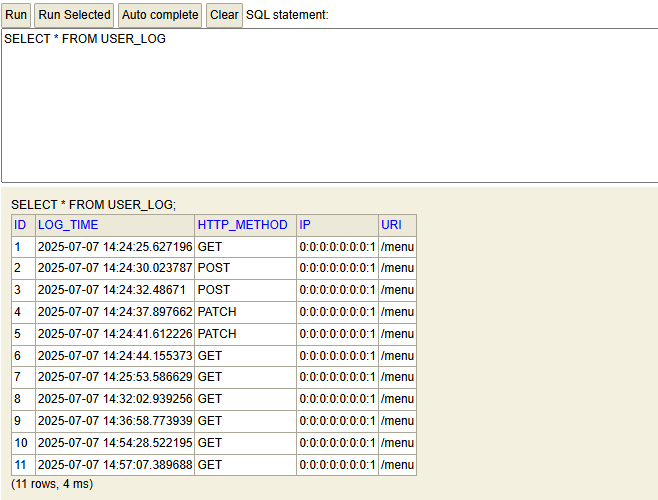
⚠️ 구현 시 주의할 점
1. 로그 파일 확장자 확인

로그 파일 경로를 지정할 때 반드시 확장자명까지 포함해야 합니다.
예를 들어 C:/log/user-action.log처럼 .log를 명시하지 않으면 Java는 해당 파일을 찾지 못합니다
2. 스케줄링 기능 활성화 필수
Spring에서 @Scheduled 애노테이션을 사용하려면 메인 클래스 또는 설정 클래스에 @EnableScheduling을 반드시 선언해야 합니다.
📌 다음 계획
- yyyymmdd 컬럼 추가
- 만약 로그 저장이 정상적이지 않을때 특정 날짜의 데이터를 삭제해야하는데 현재 구조로는 log_time밖에 없음
- 날짜를 입력받아 처리되도록 api 추가
- 현재는 당일 날짜만 db저장되는 구조임
'어드민 프로젝트' 카테고리의 다른 글
| 어드민 프로젝트 사용자 행동 로그파일 저장(AOP) - 2 (0) | 2025.06.06 |
|---|---|
| 어드민 프로젝트 mapstruct 적용 - 1 (0) | 2025.05.26 |
| 프로젝트 하면서 찾아본 내용 (0) | 2025.05.16 |